• Skip to main content
  • Home
  • Our Services
    • Conditions we support
    • Steady On Your Feet
    • How to access our services
    • Initial Health Screening
    • Classes
    • The Vista Hubs
    • Workplace Wellness
    • Healthcare Videos
  • About Us
    • Vision, Mission and Values
    • Vista Directors
    • Vista Sponsors
  • Policies & Procedures
    • Our General Policy Documents
    • Safeguarding
    • GDPR
  • Contact
  • Vista Education
    • Courses
    • Learner Portal
    • Policies & Procedures
  • Volunteering
    • Apply to Volunteer
    • Volunteer Resources
    • Safe Space

Vista Wellbeing

Your Journey - Our Support

Home » Learner Resources » Level 3 Pilates Instructor » Pilates Session 1

Pilates Session 1

In today’s sesson we covered the following topics

  • Course Structure – exploring the LAP and assessments
  • Signposting the Appeals and EDI policies
  • Agreeing a general study plan
  • Exploring Unit 2: Supporting Clients (to prepare for worksheet). Click here to download the Worksheet
  • Exploring the Equality Act 2010 and the 9 protected characteristics. Discussing what EDI means in a Pilates setting.
  • An overview of the four special populations.
  • PAR-Q and scope practice – find the official PAR-Q website here: https://eparmedx.com/?page_id=79
  • Informed consent – dowload the document here
  • The AIQ PAR-Q form for the course (NB is slightly different to the current on from the official as its based on the 2002 version, a but the 7 questions are there). Grab it here
  • Absolute “red flags” and contraindications for exercise – download here
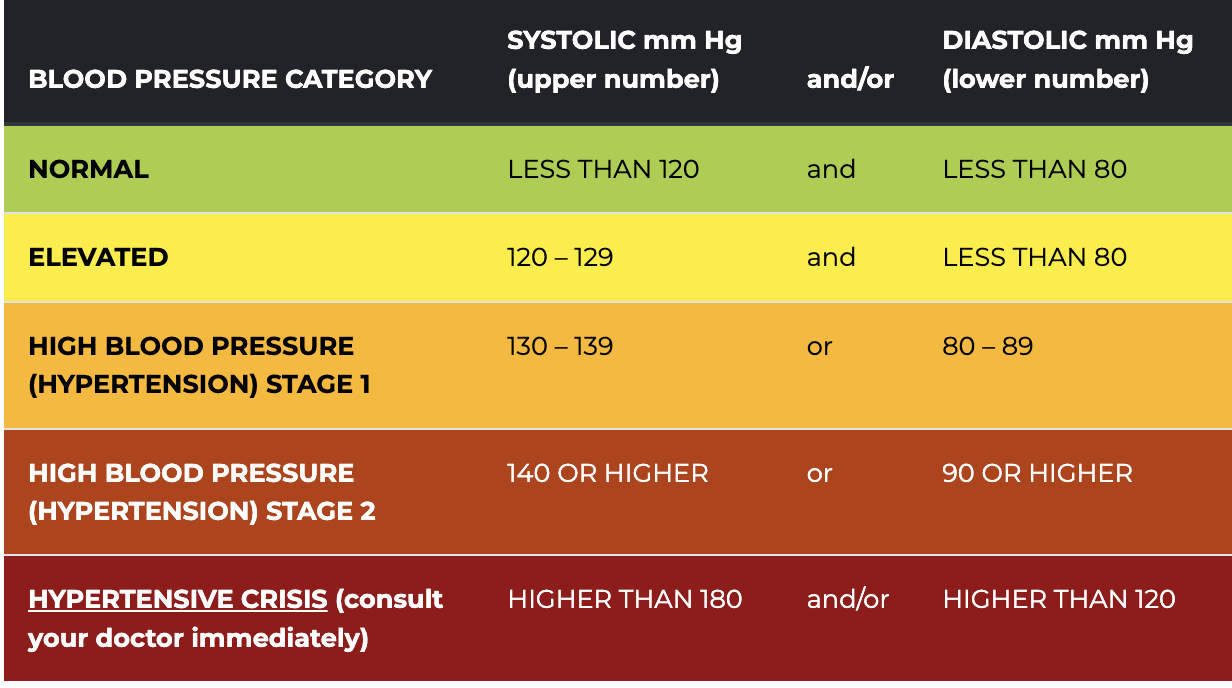
  • Hypertension chart and information about high blood presure can be found here: https://www.bloodpressureuk.org/your-blood-pressure/understanding-your-blood-pressure/what-do-the-numbers-mean/
HOMEWORK
To read Unit 2 manual and resources as required and complete Unit 2 Worksheet (download link above)
. This can be completed on computer and then emailed to vistaeducation.centre@gmail.com

BELOW ARE SLIDES TO SUPPORT UNIT 2

1-RelationshipsDownload
2-BarriersDownload
3-Supporting-clientsDownload
4-Customer-service-1Download
All-slidesDownload

Suggested videos:

PILATES ON FIFTH – select the “Oldest” playlist of videos https://www.youtube.com/@PilatesAcademyInternational/videos

DARIEN GOLD – for examples of perfect form and control https://www.youtube.com/watch?v=NXHjMYTcLZI AND https://www.youtube.com/watch?v=pU-CuKVKkFM

EXAMPLES OF THE FULL 34 as a sequence: https://www.youtube.com/watch?v=rfJwkj6tr64&t=207s  AND https://www.youtube.com/watch?v=H3D_RnGYYss&t=569s

Copyright © 2026 · Magazine Pro on Genesis Framework · WordPress · Log in

Manage Consent
To provide the best experiences, we use technologies like cookies to store and/or access device information. Consenting to these technologies will allow us to process data such as browsing behaviour or unique IDs on this site. Not consenting or withdrawing consent, may adversely affect certain features and functions.
Functional Always active
The technical storage or access is strictly necessary for the legitimate purpose of enabling the use of a specific service explicitly requested by the subscriber or user, or for the sole purpose of carrying out the transmission of a communication over an electronic communications network.
Preferences
The technical storage or access is necessary for the legitimate purpose of storing preferences that are not requested by the subscriber or user.
Statistics
The technical storage or access that is used exclusively for statistical purposes. The technical storage or access that is used exclusively for anonymous statistical purposes. Without a subpoena, voluntary compliance on the part of your Internet Service Provider, or additional records from a third party, information stored or retrieved for this purpose alone cannot usually be used to identify you.
Marketing
The technical storage or access is required to create user profiles to send advertising, or to track the user on a website or across several websites for similar marketing purposes.
  • Manage options
  • Manage services
  • Manage {vendor_count} vendors
  • Read more about these purposes
View preferences
  • {title}
  • {title}
  • {title}